Networking
The Twizy uses a Teltonika RUT950 industrial 4G/LTE router as its onboard network gateway, combined with a NetBird mesh VPN to enable secure remote access to all ROS2 nodes from anywhere with internet connectivity.
Architecture
graph LR
    subgraph vehicle["Twizy (on-board)"]
        rut950["RUT950\n(4G/LTE router)"]
        pc["On-board PC\n(Ubuntu 22.04)"]
        ds["FastDDS\nDiscovery Server\n:11811"]
        pc --- ds
        rut950 --- pc
    end

    subgraph remote["Remote Operator"]
        laptop["Laptop\n+ Xbox Controller"]
        teleop["teleop_joy_xbox\n(ROS2 node)"]
        laptop --- teleop
    end

    rut950 -->|"4G/LTE"| internet["Internet"]
    internet -->|"NetBird VPN\n(mesh P2P)"| laptop
    teleop <-->|"ROS2 Topics\nvia Discovery Server"| ds
RUT950 Router
The Teltonika RUT950 provides mobile connectivity to the vehicle.
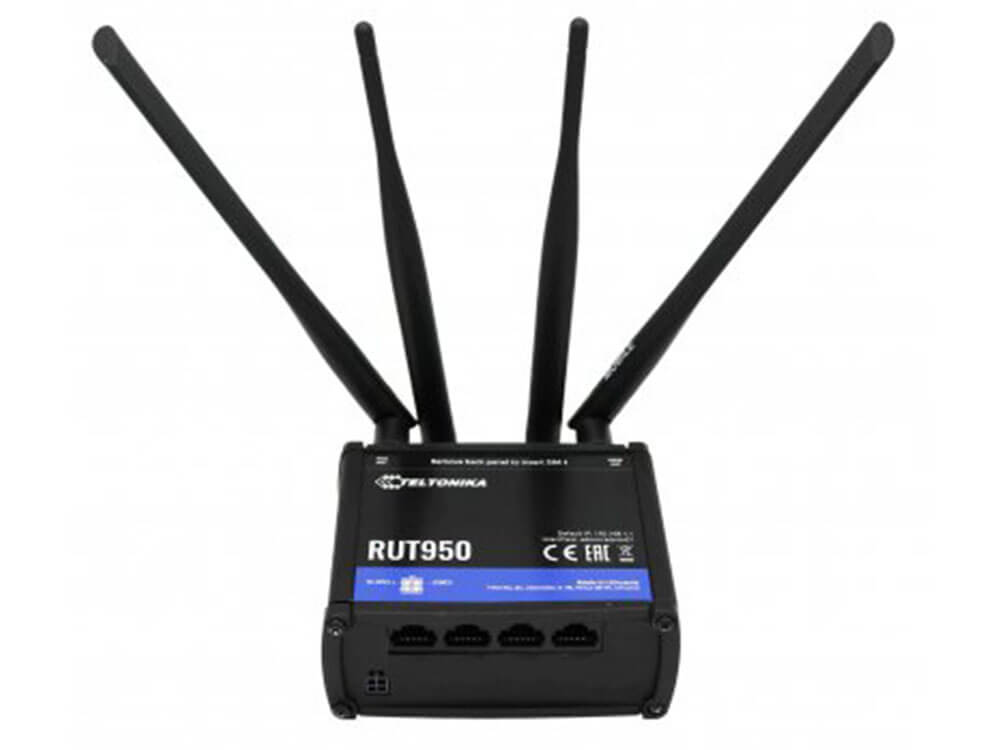
| Spec | Value |
|---|---|
| Technology | 4G LTE Cat 4 (up to 150 Mbps download), 3G, 2G |
| SIM | Dual SIM with automatic failover |
| WiFi | IEEE 802.11b/g/n (AP + STA) |
| Ethernet | 4 ports × 10/100 Mbps (1 WAN + 3 LAN) |
| CPU | Atheros Wasp, MIPS 74Kc, 550 MHz |
| RAM | 128 MB DDR2 |
| Storage | 16 MB Flash |
| Power | 9–30 VDC (4-pin industrial connector) |
| OS | RutOS (OpenWrt-based Linux) |
| Housing | Aluminium with plastic panels |
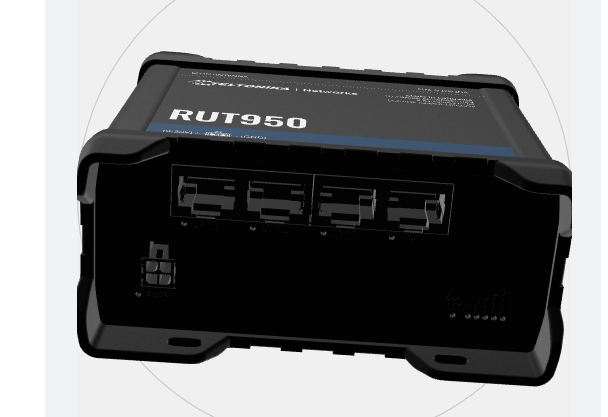
Physical installation
The router's WiFi/config credentials are on a label on the back of the device. A 3D-printed bracket is needed to mount it in the rear of the vehicle.
SIM card
Connectivity was validated with a test SIM. A dedicated SIM plan must be purchased for production use.
NetBird VPN
NetBird creates an encrypted mesh VPN between all team devices. Each machine gets a stable hostname and IP on the NetBird network regardless of its physical network or NAT.
Why NetBird
- No static IP needed on the vehicle — the RUT950 has a dynamic 4G IP
- Peer-to-peer when possible (low latency), relay fallback when NAT blocks direct connection
- Works over 4G, WiFi, and any internet connection
- Free tier available for small teams (self-hosted or cloud)
Installation (all machines)
Authentication and connection
# Generate an authentication token in the NetBird dashboard (cloud or self-hosted)
sudo netbird up --setup-key <generated_token>
Verification
Network considerations for ROS2
The ROS2 Docker containers must use network_mode: host so that ROS2 traffic is routed through the NetBird interface (wt0) rather than being isolated inside Docker's bridge network.
Camera GigE interface conflict
The FastDDS Discovery Server must be configured to listen only on the NetBird interface (wt0), not on the GigE camera interface (169.254.x.x). Running the server on all interfaces caused a conflict that prevented the camera from connecting.
FastDDS Discovery Server
Standard ROS2 relies on multicast for node discovery, which does not work across VPN tunnels or between machines on different networks. The solution is a centralized FastDDS Discovery Server running on the vehicle, which all nodes (local and remote) register with via unicast.
How it works
sequenceDiagram
    participant V as Vehicle PC
    participant DS as Discovery Server (port 11811)
    participant O as Remote Operator

    V->>DS: register nodes (local, via 127.0.0.1 or wt0)
    O->>DS: register nodes (via NetBird IP)
    DS-->>V: peer list
    DS-->>O: peer list
    V<-->>O: ROS2 topic exchange (unicast)
Setup on the vehicle
FROM ros:humble-ros-core
RUN apt-get update && apt-get install -y \
    ros-humble-rmw-fastrtps-cpp \
    fastdds-tools \
    && rm -rf /var/lib/apt/lists/*
ENTRYPOINT ["fastdds", "discovery"]
services:
  discovery-server:
    build:
      context: .
      dockerfile: Dockerfile.server
    container_name: fastdds_server
    network_mode: "host"        # must use host to reach NetBird wt0 interface
    command: -i 0               # discovery server ID 0
    restart: unless-stopped
docker compose up -d discovery-server

# Or without Docker:
source /opt/ros/humble/setup.bash
fastdds discovery -i 0
GigE camera conflict
Running the Discovery Server without binding it to a specific interface caused it to advertise on the camera's GigE interface (169.254.x.x), blocking camera connections. Using network_mode: host combined with the NetBird-only FastDDS profile resolves this.
Environment variables
Vehicle side:
Operator side:
export ROS_DISCOVERY_SERVER=twizy:11811   # NetBird hostname of the vehicle
export ROS_SUPER_CLIENT=true              # disables multicast, forces Discovery Server usage
export ROS_DOMAIN_ID=0
export RMW_IMPLEMENTATION=rmw_fastrtps_cpp
| Variable | Value | Description |
|---|---|---|
ROS_DISCOVERY_SERVER |
twizy:11811 |
NetBird hostname (or IP) of the vehicle running the server |
ROS_DOMAIN_ID |
0 |
Must be identical on all machines in the network |
ROS_SUPER_CLIENT |
true |
Disables multicast, forces exclusive use of Discovery Server |
RMW_IMPLEMENTATION |
rmw_fastrtps_cpp |
Sets FastDDS as the ROS2 middleware |