Remote Teleoperation
The Twizy supports remote teleoperation via an Xbox controller connected to an operator laptop anywhere with internet access. Communication happens through the NetBird VPN and a FastDDS Discovery Server on the vehicle.
System Overview
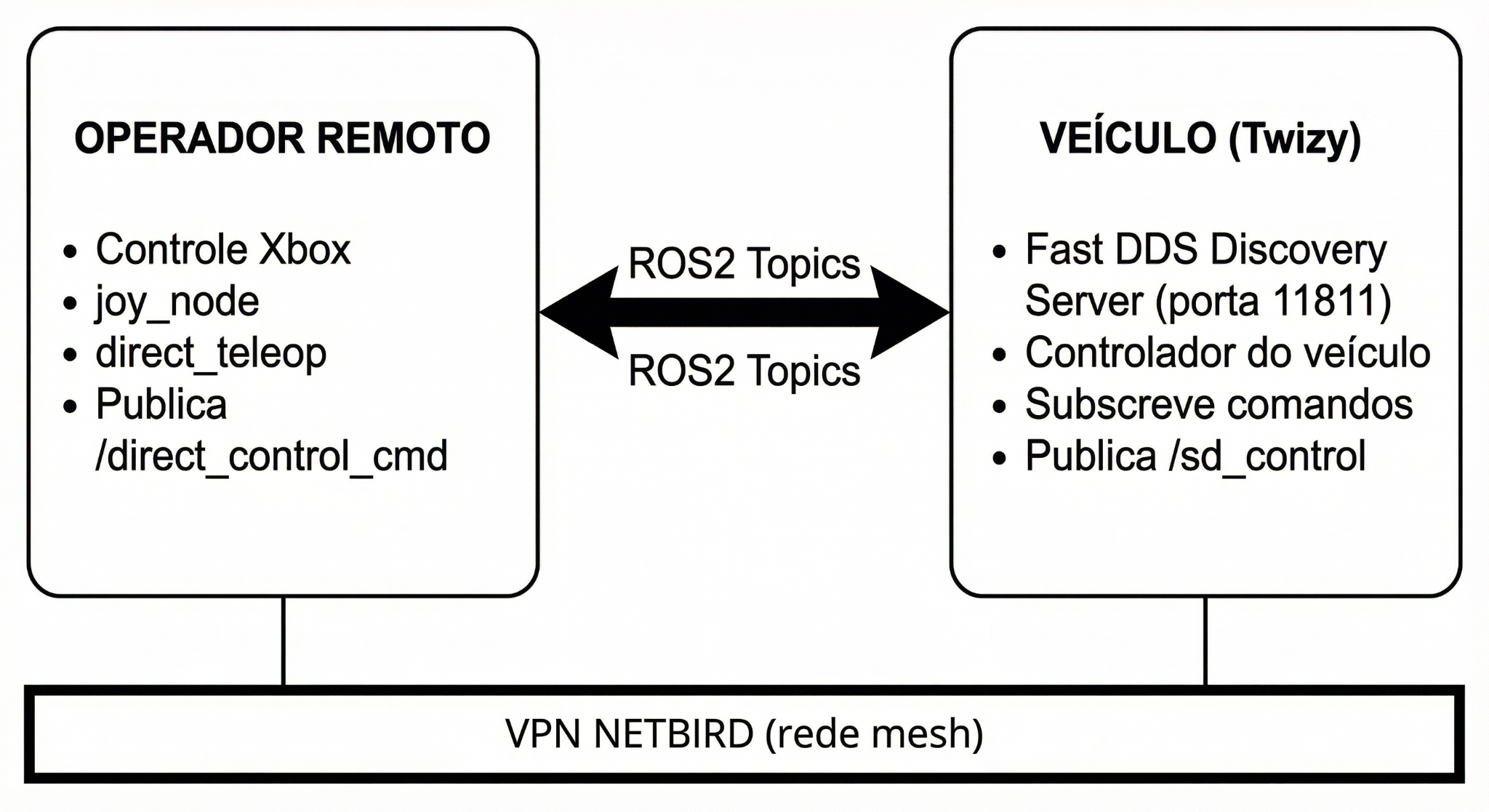
REMOTE OPERATOR                          VEHICLE (Twizy)
─────────────────────────────────────────────────────────
Xbox Controller                          FastDDS Discovery Server
     │                                         │ (port 11811)
  joy_node                              Vehicle controller nodes
     │                                         │
direct_teleop ──── /direct_control_cmd ──► SD-VehicleInterface
                ◄── /sd_control ──────────────┘
        └─────────── VPN NETBIRD (mesh) ───────┘
Command flow:
- Operator sends torque and steering setpoints via
/direct_control_cmd - Vehicle PC subscribes, applies commands to the Twizy via CAN, and publishes current state to
/sd_control - The Discovery Server on the vehicle converts multicast ROS2 traffic to unicast, enabling cross-VPN communication
Requirements
| Component | Version | Role |
|---|---|---|
| OS | Ubuntu 22.04 LTS | Base for ROS2 Humble |
| ROS2 Middleware | rmw_fastrtps_cpp |
Required for Discovery Server |
| VPN | NetBird (latest) | Mesh P2P communication |
| Containerization | Docker 24.x+ | Environment isolation |
Hardware: - Operator: laptop with USB or Bluetooth Xbox controller - Vehicle: on-board PC connected to Twizy CAN bus - Both sides need internet access for the VPN
Operation Procedure
On the vehicle
# 1. Verify NetBird is connected and note the IP
netbird status

# 2. Start the Discovery Server
docker compose up -d discovery-server

# 3. Start the vehicle control nodes (subscribes /direct_control_cmd, publishes /sd_control)
docker compose up -d carro
On the operator machine
# 1. Verify NetBird connectivity
ping twizy

# 2. Set environment variables
export ROS_DISCOVERY_SERVER=twizy:11811   # NetBird hostname of the vehicle
export ROS_SUPER_CLIENT=true
export ROS_DOMAIN_ID=0
export RMW_IMPLEMENTATION=rmw_fastrtps_cpp

# 3. Start the teleop stack
docker compose up -d

# 4. Verify topics are visible
ros2 topic list
# Should show /direct_control_cmd and /sd_control
ROS2 Package Structure
ws/
├── teleop_joy_xbox/          # Teleoperation package
│   ├── config/
│   │   └── xbox_controller.yaml
│   ├── launch/
│   │   ├── xbox_teleop.launch.py      # Mode 1: Twist (cmd_vel)
│   │   └── direct_teleop.launch.py    # Mode 2: Direct Control
│   └── teleop_joy_xbox/
│       ├── xbox_teleop_node.py
│       └── direct_teleop.py
└── sd_msgs/                  # Custom messages
    └── msg/
        ├── DirectControl.msg
        └── SDControl.msg
Control Modes
Mode 1 — Standard Twist
- Message type:
geometry_msgs/Twist - Topic:
/cmd_vel - Use: generic mobile robots
Mode 2 — Direct Control (recommended for Twizy)
- Messages:
sd_msgs/DirectControl(commands),sd_msgs/SDControl(feedback) - Topics:
/direct_control_cmd→/sd_control - Use: direct torque and steering control of the vehicle
Xbox Controller Interface
The teleoperation stack uses an Xbox controller (USB or Bluetooth) on the operator's machine to generate drive commands sent to the vehicle over the NetBird VPN.
Button Mapping (Direct Control mode)
| Command | Button/Axis | Technical Description |
|---|---|---|
| Accelerate | RT (Right Trigger) | Sets positive torque setpoint |
| Brake | LT (Left Trigger) | Sets negative torque setpoint |
| Steer | Left Analog Stick | Controls front wheel angle |
| Safety center | LB button | Immediately centers steering |
| Increase speed limit | Y button | Raises maximum velocity limit |
| Decrease speed limit | B button | Lowers maximum velocity limit |
| Increase brake intensity | X button | Increases braking force |
| Decrease brake intensity | A button | Decreases braking force |
Speed-dependent steering
direct_teleop applies a lookup table that automatically limits the steering angle as vehicle speed increases — wider turns are blocked at high speed.
Custom ROS2 Messages
DirectControl.msg (operator → vehicle)
float64 linear_velocity    # linear velocity (optional)
float64 torque_setpoint    # -100 (full brake) to +100 (full throttle)
float64 steer_setpoint     # -100 (right) to +100 (left)
SDControl.msg (vehicle → operator, feedback)
std_msgs/Header header
float64 steer              # current steering angle
float64 torque             # current torque
float64 current_velocity   # measured vehicle speed
float64 target_velocity    # target speed setpoint
int32   p, d, i, ff        # velocity PID terms
int32   steer_p, steer_i, steer_d  # steering PID terms
float64 steer_actual       # actual steering angle from sensor
Joystick device access in Docker
The teleop container needs access to the host's input devices:
volumes:
  - /dev/input:/dev/input:rw    # access to input drivers
  - /run/udev:/run/udev:ro      # correct joystick identification via udev
devices:
  - /dev/input                  # explicit permission for Xbox controller
Verifying the joystick is detected
# On the host (before starting Docker)
ls /dev/input/js*
# Should show /dev/input/js0 (or similar)

# Inside the container
ros2 run joy joy_node --ros-args -r /joy:=joy_teleop_test
ros2 topic echo /joy_teleop_test
# Move a stick — values should change in the output
Docker Compose (operator side)
services:
  discovery-server:
    build:
      context: .
      dockerfile: Dockerfile.server
    container_name: fastdds_server
    network_mode: "host"
    command: -i 0
    restart: unless-stopped

  teleop-client:
    build:
      context: .
      dockerfile: Dockerfile.client
    container_name: ros2_teleop_joy
    network_mode: "host"
    depends_on:
      - discovery-server
    environment:
      - ROS_DISCOVERY_SERVER=twizy:11811
      - ROS_DOMAIN_ID=0
      - ROS_SUPER_CLIENT=true
      - RMW_IMPLEMENTATION=rmw_fastrtps_cpp
    volumes:
      - ./ws:/root/ros2_ws/src:rw
      - /dev/input:/dev/input:rw
      - /run/udev:/run/udev:ro
    devices:
      - /dev/input
    command: ros2 run joy joy_node --ros-args -r /joy:=joy_teleop_test
network_mode: host is mandatory
Without network_mode: host, Docker routes traffic through its bridge network instead of the NetBird interface (wt0). The ROS2 nodes would never reach the Discovery Server on the vehicle.